*Splitgate 2* is shaping up to be one of the most eagerly awaited games of 2025. Fans are thrilled to dive into the sequel of this beloved title, yet the game remains in its Alpha phase, which means it's still a work in progress. Expect crashes, frame drops, and other performance hiccups. However, with the right settings, you can optimize your gameplay to achieve a high framerate and minimize input lag. Here’s how to set up *Splitgate 2* for the best performance.
Related: What Is Splitgate 2's Release Date?
Splitgate 2 System Requirements
Before diving into optimization, make sure your system meets the game's requirements. Splitgate 2 is designed to be accessible, with modest hardware demands.
Minimum:
- Processor: Intel® Core™ i3-6100 / Core™ i5-2500K or AMD Ryzen™ 3 1200
- Memory: 8 GB RAM
- Graphics: NVIDIA® GeForce® GTX 960 or AMD Radeon™ RX 470
Recommended:
- Processor: Intel® Core™ i5-6600K / Core™ i7-4770 or AMD Ryzen™ 5 1400
- Memory: 12 GB RAM
- Graphics: NVIDIA® GeForce® GTX 1060 or AMD Radeon™ RX 580
Splitgate 2 Best Video Settings
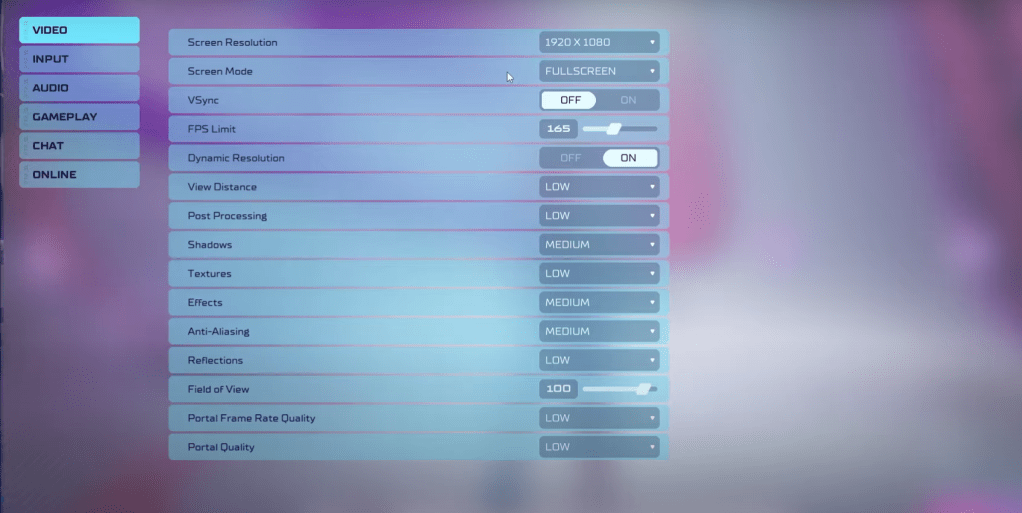
As a competitive multiplayer shooter, Splitgate 2 thrives on performance. Here are the optimal settings to prioritize speed over visual fidelity:
- Screen Resolution – Monitor's Native (1920×1080 is common)
- Screen Mode – Borderless Fullscreen for frequent Alt+Tab use, otherwise Fullscreen
- VSync – Off to avoid input lag
- FPS Limit – Set to your monitor's refresh rate (60, 144, 165, 240, etc.)
- Dynamic Resolution – On, though experiment with Off based on your system
- View Distance – Low
- Post Processing – Low
- Shadows – Medium, drop to Low for older systems
- Effects – Low
- Anti-Aliasing – Low, adjust higher if you see shimmering
- Reflection – Low
- Field of View – Max for competitive edge, but lower by 3-4 for performance gains
- Portal Frame Rate Quality – Low
- Portal Quality – Low
In essence, setting most options to their lowest will boost performance. If you crave a bit more visual appeal, you can bump up Effects and Anti-aliasing, as these have a minimal impact on performance.
The Field of View (FOV) setting significantly affects framerate. For a competitive advantage, max out FOV, but reducing it slightly can enhance performance without a major visual impact.
Other Recommended Settings for Splitgate 2
While these tweaks won’t directly boost FPS, they enhance your overall experience. Adjust sensitivities to your preference, perhaps using an online calculator to convert settings from other shooters you enjoy.
On the audio front, lower the game's music to avoid distractions, and enable Spatial Sound in Windows settings for better audio cues, a tip applicable across all games.
That wraps up the best settings guide for Splitgate 2. Enjoy your optimized gameplay!
Related: 10 of the Most Fun Games to Play With Friends