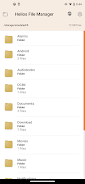
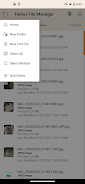
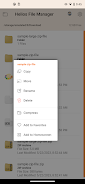
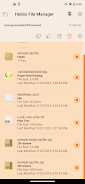
Introducing Helios FileManager, the ultimate file management solution from Ape Apps. Helios is a user-friendly file manager for beginners and advanced users alike. It offers standard file browsing features such as copy, move, delete, and rename, as well as batch processing and multi-select functionality. With Helios, you can easily send files to your favorite cloud storage services like Dropbox, Google Drive, and Microsoft OneDrive. It also supports Samsung Multiwindow, allowing for multitasking on compatible devices. Manage your files and external SD card effortlessly, choose between list mode or grid view, and even extract data from zip files. Helios also features a built-in text editor with printing capabilities and allows you to create and edit various file types such as txt, html, js, css, and xml files. Download Helios FileManager now and discover the best file management package on the market!
Features of the Helios File Manager App:
- Standard file browsing and management features: The app allows users to navigate and manage files on their devices, including support for SD card and root directory.
- Copy, move, delete, and rename files: Users can perform these actions on individual files or process multiple files at once using the multi-select feature.
- Integration with cloud storage services: The app enables users to send files directly to popular cloud storage services like Dropbox, Google Drive, and Microsoft OneDrive.
- Samsung Multiwindow support: This feature is available on compatible Samsung devices, allowing users to use the app in a split-screen mode.
- Hidden files management: Users can choose to show or hide hidden files for better organization and privacy.
- Additional features: The app offers easy management of external SD cards, the option to switch between file list mode or grid view mode, display graphic thumbnails for image files, create home screen shortcuts for quick access to files or folders, and supports zip file extraction. It also includes a built-in text editor with support for various file formats.
Conclusion:
The Helios File Manager App is a comprehensive file management solution that caters to both beginners and advanced users. With its user-friendly interface and extensive list of features, it offers a convenient and efficient way to manage files on mobile devices. The app's integration with cloud storage services, support for Samsung Multiwindow, and various customization options make it a versatile choice. The constant improvements and willingness to listen to user feedback make Helios a promising file management package in the market. Users should consider downloading and exploring the app for a seamless file management experience.