Home Apps Tools Brightness Control & Dimmer
Brightness Control & Dimmer

Brightness Control & Dimmer Rate : 4.1

  • Category : Tools
  • Version : 1.7.3
  • Size : 6.00M
  • Update : Dec 10,2024
Download
Application Description

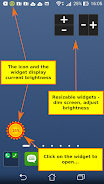
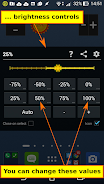
Introducing Brightness Control & Dimmer, a user-friendly Android app designed to simplify brightness control on your device. With customizable brightness controls, you can assign your preferred brightness levels to quick buttons, allowing for one-click adjustments. The app also features a dimmer/screen filter that can reduce screen brightness beyond the system's minimum level, ideal for eye protection and battery conservation. Conveniently, you can control brightness from anywhere using the notification buttons, even on the lock screen. Download this free app today and experience a more convenient way to manage brightness on your Android device.

Features:

  • User-friendly brightness control widget with custom brightness user levels.
  • Dimmer/screen filter that can make your screen darker than the system's minimum brightness level.
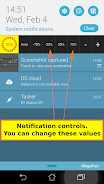
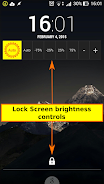
  • Brightness control buttons in the notification that work even on your lock screen.
  • Saves battery and protects your eyes.
  • Convenient widget with customizable brightness controls.
  • Dimmer/screen filter/night mode that allows you to reduce brightness to lower values than the default settings allow.

Conclusion:

Brightness Control & Dimmer provides a convenient and user-friendly solution for controlling brightness on Android devices. Its customizable widget and dimmer/screen filter features empower users to easily adjust screen brightness to their liking. The app's battery-saving and eye-protective capabilities make it a valuable tool. Compatible with most devices and offering a risk-free upgrade option, Brightness Control & Dimmer delivers a reliable and efficient way to manage screen brightness on Android devices.
Screenshot
Brightness Control & Dimmer Screenshot 0
Brightness Control & Dimmer Screenshot 1
Brightness Control & Dimmer Screenshot 2
Brightness Control & Dimmer Screenshot 3
Latest Articles More
  • Sonic Celebrates 35th Anniversary with Exclusive Calendar and Art Unveiled

    Sonic the Hedgehog marks its 35th milestone with exciting reveals from a recent Amazon listing. Discover the new artwork and merchandise tied to Sonic’s anniversary and Sega’s playful rivalry with Mar

    Jan 16,2026
  • Epic’s iOS Antitrust Win Returns Fortnite to Australia

    Fortnite is poised to return to iOS devices, this time specifically in Australia.A recent court ruling determined that Apple and Google had restricted competition on their mobile platforms.Epic Games now intends to bring Fortnite back to iOS in Austr

    Jan 16,2026
  • Pokemon TCG Pocket Launches Pawmot Vengeance Event

    Jump into exclusive Solo Battles during this limited-time event to earn special promo cards.The Promo Pack A Series Vol. 6 features exclusive cards like Pawmot, Ekans, and Machamp.Don't miss out—this event concludes on April 17th.Following a massive

    Jan 16,2026
  • Epic RPG Adventure to Fate: Core Quest Hits iOS

    Adventure to Fate: Core Quest launches today for iOSThe newest installment in the acclaimed dungeon-crawler series introduces 12 character classes, 20 playable races, 700+ abilities, and industry-leading accessibility featuresThe game sets a new stan

    Jan 16,2026
  • Disney Dreamlight Valley: Storybook Vale Event Returns

    Disney Dreamlight Valley's Storybook Vale event unveils its exciting second chapterEncounter the legendary villain Maleficent and reunite with Princess Aurora in this magical updateInvestigate the mysterious disturbances plaguing the Unwritten Realms

    Jan 15,2026
  • Raid Shadow Legends Adds New Champions in April 2025

    Clash Royale has finally introduced a major upgrade for its Inferno Dragon character. After nearly ten years without evolutionary improvements, this legendary fiery creature receives powerful enhancements. To celebrate the occasion, Supercell teamed

    Jan 15,2026